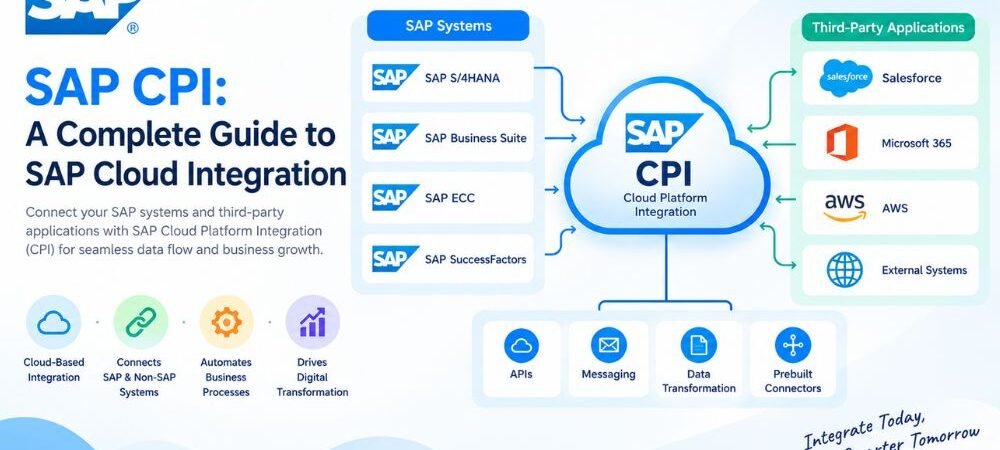
SAP CPI is a cloud-based integration technology used to connect SAP applications, non-SAP systems, APIs, databases, and cloud platforms. It helps businesses exchange data between different applications through controlled integration flows.
Modern organizations often use multiple systems for finance, sales, human resources, procurement, customer management, inventory, and e-commerce. These systems may use different data structures, APIs, file formats, and communication protocols. Integration connects these systems so that business data can move between them without repeated manual entry.
SAP CPI, commonly used to refer to SAP Cloud Integration, is part of SAP Integration Suite on the SAP Business Technology Platform (SAP BTP). It provides tools for developing, deploying, monitoring, and managing integration processes.
What Is SAP CPI?
SAP CPI stands for SAP Cloud Platform Integration, a name historically used for SAP’s cloud integration service. The service is now generally known as SAP Cloud Integration within SAP Integration Suite.
SAP CPI allows organizations to connect applications and transfer information between them. It can receive data from a source system, process the information, transform the message, and deliver it to a target system.
For example, an online store can send a customer order to SAP S/4HANA. SAP CPI can receive the order, validate its information, map the data fields, and send the processed message to the SAP system.
A simple integration architecture is:
Source System → SAP CPI → Data Processing → Target System
The source and target can be SAP applications, third-party applications, APIs, databases, or file systems.
How Does SAP CPI Work?
SAP CPI works through integration flows, commonly known as iFlows. An iFlow defines how data moves from one system to another and what processing should happen during the transfer.
A typical process begins when a source system sends a message. An adapter receives the message and passes it into the integration flow.
The flow can then perform several operations. These may include data mapping, transformation, filtering, validation, routing, and business logic.
After processing, SAP CPI sends the message to the target system.
For example:
E-commerce Platform → REST API → SAP CPI → Mapping → Validation → SAP S/4HANA
This process allows two applications to exchange information without requiring a direct custom connection between them.
What Is an iFlow in SAP CPI?
An iFlow, or integration flow, defines the technical steps required to process a message.
An iFlow can contain a sender, receiver, adapters, message mappings, routers, filters, content modifiers, scripts, transformations, and exception-handling processes.
For example, an order integration may receive an order from an e-commerce platform, check the required fields, transform the data structure, and send the result to SAP S/4HANA.
The iFlow controls this complete process.
Integration flows can be developed, tested, deployed, and monitored within the SAP Cloud Integration environment.
SAP CPI Adapters
Adapters allow SAP CPI to communicate with different applications and systems. The adapter is selected according to the communication technology used by the source or target system.
Common integration technologies include:
REST, SOAP, HTTP, HTTPS, OData, SFTP, IDoc, and JDBC-related connectivity.
For example, a system that exposes a REST API can communicate through a REST or HTTP-based connection. A file-based integration may use SFTP.
The adapter manages the technical communication between SAP CPI and the connected application.
SAP CPI Data Transformation
Different applications often store data in different formats. One application may use JSON while another requires XML. Field names and data structures can also vary.
SAP CPI provides transformation and mapping capabilities to convert information into the structure required by the receiving system.
For example, a source application may send:
customer_id
while the target system expects:
CustomerNumber
A message mapping can connect these fields.
Transformation can also include changes between XML and JSON structures, field conversion, data filtering, restructuring, and other processing operations.
SAP CPI Message Mapping
Message mapping is used when the source and target systems have different data structures.
Suppose a source system contains:
firstName
lastName
The target application may require:
First_Name
Last_Name
Email_Address
SAP CPI can map the source fields to the required target fields.
Mappings can also use functions and transformation rules when the target application requires a different value, format, or structure.
Accurate mapping is important because incorrect field relationships can cause rejected or incomplete messages.
SAP CPI Integration With SAP S/4HANA
SAP S/4HANA is a major enterprise application that can be connected through SAP CPI.
Organizations can use SAP CPI to exchange information between S/4HANA and external applications. Common data types include customers, products, sales orders, invoices, suppliers, purchase orders, and inventory information.
For example, an e-commerce platform can send an order to SAP S/4HANA through an integration flow.
The process can include:
Order Received → Data Validation → Field Mapping → SAP S/4HANA
SAP CPI can also support information flowing from SAP S/4HANA to external applications. Inventory information, product information, and other business data can be transferred to connected systems.
SAP CPI Integration With SAP Applications
SAP CPI can connect different SAP applications as part of an enterprise integration architecture.
Common SAP applications and services used in integration scenarios include SAP S/4HANA, SAP SuccessFactors, SAP Ariba, SAP Concur, and other SAP solutions.
For example, employee information from SAP SuccessFactors can be integrated with another business application when the required interface and business process are available.
Procurement information can also move between SAP Ariba and other enterprise systems.
The exact integration method depends on the application, available interfaces, data structure, authentication method, and business requirements.
SAP CPI Integration With Non-SAP Systems
SAP CPI is not limited to SAP applications. It can also connect third-party and custom applications.
Businesses may need to connect SAP systems with:
CRM platforms, e-commerce systems, payment applications, logistics platforms, databases, web applications, and external APIs.
For example, a company using a third-party CRM can exchange customer information with SAP S/4HANA through SAP CPI.
This makes SAP CPI useful in environments where an organization operates both SAP and non-SAP technologies.
SAP CPI API Integration
APIs provide a structured method for applications to exchange information.
SAP CPI supports API-based integration scenarios using technologies such as REST and SOAP.
A REST API commonly exchanges structured information such as JSON. SOAP services commonly use XML-based messages.
SAP CPI can receive an API request, process the message, transform the data, and send it to another application.
For example:
CRM API → SAP CPI → Data Transformation → SAP S/4HANA
This architecture can support automated data exchange between cloud applications and enterprise systems.
SAP CPI Security
Security is an important part of cloud integration. SAP CPI supports authentication and secure communication mechanisms for connected systems.
Depending on the integration scenario, organizations can use authentication methods such as certificates, OAuth, basic authentication, and other supported methods.
Secure protocols such as HTTPS and SFTP can be used for protected data transmission.
Integration security also involves credentials, certificates, access permissions, authorization, endpoint protection, and secure configuration.
Sensitive business information should be transmitted through properly secured connections and authorized endpoints.
SAP CPI Error Handling
Integration processes can fail for many reasons. Common causes include invalid data, authentication failures, unavailable endpoints, incorrect mappings, network problems, and application errors.
SAP CPI provides error-handling capabilities that allow developers to manage failed processing.
Exception subprocesses can be configured to handle errors within an integration flow. The integration team can also use monitoring information to identify the cause of a failed message.
For example, if an order does not contain a required customer ID, the integration process can identify the missing value before sending the message to the target system.
Effective error handling helps prevent incomplete or invalid data from moving through business systems.
SAP CPI Monitoring
Monitoring allows integration teams to review the status of integration flows and message processing.
SAP CPI provides monitoring capabilities that can help identify successful and failed messages. Teams can investigate processing information and troubleshoot issues.
Important areas may include message status, integration flow execution, endpoint availability, authentication errors, mapping failures, and payload problems.
Monitoring becomes especially important when integration processes support business-critical activities such as orders, invoices, payments, employee data, or inventory.
SAP CPI for Cloud Integration
Cloud applications often operate across different vendors and platforms. An organization may use SAP S/4HANA together with CRM, HR, e-commerce, analytics, and other cloud services.
SAP CPI provides a cloud-based integration layer for these environments.
It can connect cloud-to-cloud systems and support integration between cloud applications and on-premises systems where the required connectivity is configured.
This is relevant to hybrid IT environments where business applications operate across multiple infrastructure models.
SAP CPI for Data Synchronization
Data synchronization keeps information consistent between connected applications.
For example, a business may maintain customer records in an ERP system and also need those records in a CRM platform.
SAP CPI can transfer customer information between the systems according to the defined integration process.
Other synchronization scenarios can involve products, suppliers, employees, inventory, pricing, and orders.
The synchronization method depends on the required frequency, available APIs, data volume, and business process.
SAP CPI Use Cases
SAP CPI can support many enterprise integration scenarios.
An e-commerce business can connect its online store with SAP S/4HANA for order and inventory processing. A manufacturer can connect SAP systems with logistics applications. A company can connect HR applications with employee management systems.
Other integration scenarios include customer data exchange, product synchronization, purchase order processing, invoice integration, supplier data exchange, API integration, file transfer, and inventory updates.
Each use case requires an integration design based on the source system, target system, data structure, security requirements, and communication protocol.
SAP CPI vs Point-to-Point Integration
Point-to-point integration creates a direct connection between two systems.
This model can become difficult to manage when an organization has many applications. Each new application may require additional direct connections.
SAP CPI provides a centralized integration layer.
For example, instead of creating separate custom integration logic for every application, systems can communicate through SAP CPI using defined integration flows.
The integration layer can manage transformation, routing, communication, monitoring, and error handling.
SAP CPI and SAP Integration Suite
SAP CPI is commonly used as a name for SAP Cloud Integration, while SAP Integration Suite is the broader integration platform.
SAP Integration Suite is available on SAP Business Technology Platform and includes multiple integration capabilities.
Cloud Integration focuses on application and process integration. Other capabilities within SAP Integration Suite address areas such as API management, event-driven integration, integration assessment, and related integration requirements.
This distinction is important when discussing SAP’s current product structure.
Why SAP CPI Matters for Modern Businesses
Businesses increasingly use multiple applications to manage different functions. An ERP system may handle finance and supply chain operations, while separate applications manage CRM, HR, e-commerce, analytics, or customer support.
These applications need to exchange information.
SAP CPI provides an integration layer that can automate this exchange.
For example, an online order can move from an e-commerce platform to SAP S/4HANA. Product information can move from an ERP system to an online store. Employee information can move between HR and other business applications.
This reduces the need for repeated manual data entry and creates automated communication between connected systems.
How to Plan an SAP CPI Project
An SAP CPI project should begin with a clear definition of the business process and connected systems.
The source and target applications should be identified first. The available APIs, adapters, protocols, data formats, and authentication methods should then be reviewed.
The integration design should define required fields, data mappings, transformations, routing rules, security controls, and error-handling requirements.
Testing should cover both successful and failed scenarios. The integration should also be monitored after deployment to identify processing failures and connectivity issues.
A clear integration plan helps ensure that technical configuration supports the required business process.
Frequently Asked Questions About SAP CPI
What is SAP CPI?
SAP CPI refers to SAP Cloud Integration, a cloud-based integration capability within SAP Integration Suite. It is used to connect SAP and non-SAP applications and exchange data between business systems.
What is SAP CPI used for?
SAP CPI is used for application integration, data synchronization, API integration, data transformation, message routing, file-based integration, and communication between cloud and on-premises systems.
How does SAP CPI work?
SAP CPI receives information from a source system, processes it through an integration flow, transforms or maps the data when required, and sends the result to a target system.
What is an iFlow?
An iFlow is an integration flow that defines how a message is received, processed, transformed, routed, and delivered to another system.
Can SAP CPI connect non-SAP applications?
Yes. SAP CPI can connect SAP applications with third-party applications, APIs, databases, file systems, and other supported technologies.
Does SAP CPI support REST APIs?
Yes. SAP CPI supports REST-based integration and can process API requests and responses as part of integration flows.
Is SAP CPI part of SAP Integration Suite?
Yes. SAP Cloud Integration is a capability within SAP Integration Suite, which operates on SAP Business Technology Platform.
What is SAP CPI used for with SAP S/4HANA?
SAP CPI can connect SAP S/4HANA with other SAP applications, third-party systems, APIs, e-commerce platforms, logistics systems, and other supported applications.
Conclusion
SAP CPI is a cloud-based integration technology that connects applications, APIs, databases, and business systems. It supports important integration functions such as message processing, data transformation, message mapping, routing, security, error handling, and monitoring.
SAP CPI is commonly used to connect SAP S/4HANA and other SAP applications with non-SAP platforms. It can support cloud-to-cloud and hybrid integration scenarios.
A complete SAP CPI integration architecture should consider the source and target systems, communication protocols, data structures, authentication, transformation rules, error handling, monitoring, and business requirements.
As part of SAP Integration Suite, SAP CPI provides Cloud Integration capabilities that help organizations create automated connections between different business systems and support reliable data exchange across enterprise environments.